Text To Avro Data File using Mapreduce
We have already seen how to convert a text file to Avro data file using a simple java program. In this blog we will see how to process a text file and store the result in avro data file. To run map reduce jobs on Avro data files see this blog.
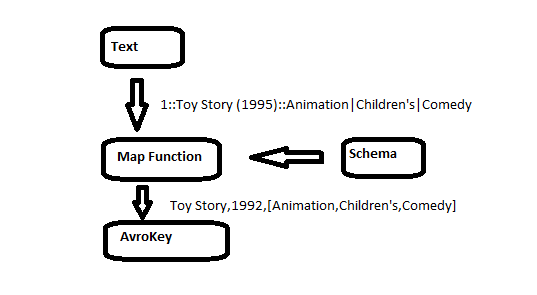
Input File Format :
Our input file is a movie database, contains the following information
serial number :: movie name (year)::tag1|tag2
example records
1::Toy Story (1995)::Animation|Children's|Comedy
2::Jumanji (1995)::Adventure|Children's|Fantasy
3::Grumpier Old Men (1995)::Comedy|Romance
4::Waiting to Exhale (1995)::Comedy|Drama
5::Father of the Bride Part II (1995)::Comedy
6::Heat (1995)::Action|Crime|Thriller
7::Sabrina (1995)::Comedy|Romance
8::Tom and Huck (1995)::Adventure|Children's
Avro Schema for output file :
we can ignore the serial number,we can store the tags in array.Check this blog to know more about the supported types. The resulting schema is
{
"name":"movies",
"type":"record",
"fields":[
 {"name":"movieName",
 "type":"string"
 },

{"name":"year",
 "type":"string"
 },

{"name":"tags",
 "type":{"type":"array","items":"string"}
 }
 ]

}
we could have stored the year in the integer format as well.
The map function will extract the different fields from the input record and constructs a generic record. The reduce function will simply write it’s key to the output, no processing is done in reducer.
Program Code
public class MRTextToAvro extends Configured implements Tool{
 public static void main(String[] args) throws Exception {
 int exitCode=ToolRunner.run(new MRTextToAvro(),args );
 System.out.println("Exit code "+exitCode);
 }

 public int run(String[] arg0) throws Exception {
 Job job= Job.getInstance(getConf(),"Text To Avro");

 job.setJarByClass(getClass());

 FileInputFormat.setInputPaths(job, new Path(arg0[0]));
 FileOutputFormat.setOutputPath(job, new Path(arg0[1]));
 Schema.Parser parser = new Schema.Parser();
 Schema schema=parser.parse(getClass().getResourceAsStream("movies.avsc"));
 job.getConfiguration().setBoolean(
 Job.MAPREDUCE_JOB_USER_CLASSPATH_FIRST, true);
 AvroJob.setMapOutputKeySchema(job,schema);
 job.setMapOutputValueClass( NullWritable.class);
 AvroJob.setOutputKeySchema(job, schema);

 job.setInputFormatClass(TextInputFormat.class);
 job.setOutputFormatClass(AvroKeyOutputFormat.class);

 job.setMapperClass(TextToAvroMapper.class);
 job.setReducerClass(TextToAvroReduce.class);

 return job.waitForCompletion(true)?0:1;
 }

 public static class TextToAvroMapper extends Mapper<LongWritable ,Text,AvroKey<GenericRecord>,NullWritable>{
 Schema schema;

 protected void setup(Context context) throws IOException, InterruptedException {
 super.setup(context);
 Schema.Parser parser = new Schema.Parser();
 schema=parser.parse(getClass().getResourceAsStream("movies.avsc"));
 }

 public void map(LongWritable key,Text value,Context context) throws IOException,InterruptedException{
 GenericRecord record=new GenericData.Record(schema);
 String inputRecord=value.toString();

 record.put("movieName", getMovieName(inputRecord));
 record.put("year", getMovieRelaseYear(inputRecord));
 record.put("tags", getMovieTags(inputRecord));
 context.write(new AvroKey(record), NullWritable.get());
 }
 public String getMovieName(String record){
 String movieName=record.split("::")[1];
 return movieName.substring(0, movieName.lastIndexOf('(' )).trim();
 }
 public String getMovieRelaseYear(String record){
 String movieName=record.split("::")[1];
 return movieName.substring( movieName.lastIndexOf( '(' )+1,movieName.lastIndexOf( ')' )).trim();
 }
 public String[] getMovieTags(String record){
 return (record.split("::")[2]).split("\\|");
 }
 }

 public static class TextToAvroReduce extends Reducer<AvroKey<GenericRecord>,NullWritable,AvroKey<GenericRecord>,NullWritable>{
 @Override
 public void reduce(AvroKey<GenericRecord> key,Iterable<NullWritable> value,Context context) throws IOException, InterruptedException{
 context.write(key, NullWritable.get());
 }
 }
}
To run the job we need to put the avro related lib on class path
export HADOOP_CLASSPATH=/path/to/targets/avro-mapred-1.7.4-hadoop2.jar

yarn jar HadoopAvro-1.0-SNAPSHOT.jar MRTextToAvro -libjars avro-mapred-1.7.4-hadoop2.jar /input/path output/path
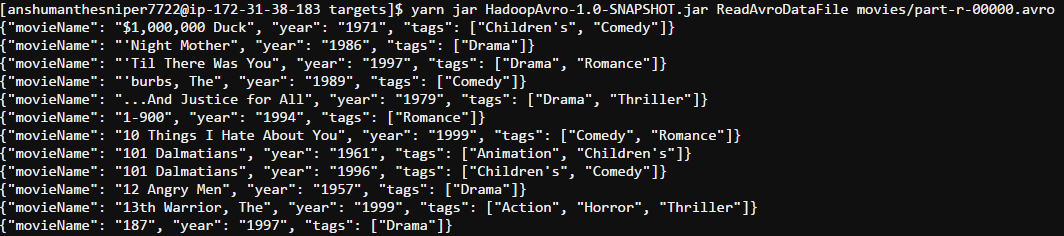
The resulting Avro file
Full project is available on github
Related Posts


About The Author

What jar file should be added ? Because is showing error for me in (import org.apache.avro.*;) in this part of code
Hi,
all the dependencies are present in pom.xml. eclipse should pull them automatically
export HADOOP_CLASSPATH=/path/to/targets/avro-mapred-1.7.4-hadoop2.jar
yarn jar HadoopAvro-1.0-SNAPSHOT.jar MRTextToAvro -libjars avro-mapred-1.7.4- hadoop2.jar /input/path output/path
In this hadoop2.jar is exported jarfile from eclipse? and export hadoop_classpath is set in bashfile? can u explain the hadoop comment for executing this(like input file is record? where you are placing movies.avsc in hdfs) in detail. Im newbie to hadoop i cant understand the flow